Name: Kyle
Web Site: http://dboptimizer.com
Bio: Kyle Hailey worked on the complete redesign of the Oracle Enterprise Manager 10g performance pages. His contributions shifted the screens to be graphically oriented and wait interface centric and these successful designs have continued to be expanded upon in 11g OEM. Recently he worked at Embarcadero Technologies where he designed the first successful product the Embarcadero has written internally and released in the last 10 years called DB Optimizer. DB Optimizer is the first product in the industry to graphically describe the relationships of tables, views and subqueries of a SQL statement using Visual SQL Tuning (VST) diagrams. Currently Kyle works as a performance Architect at Delphix. He has long and distinguished career with Oracle having worked at Oracle in support, porting, benchmarking, and kernel development. He has also worked at Quest, Embarcadero as well as other companies in the industry on performance tuning and optimization of Oracle. He has designed tools to improve high end performance monitoring such as direct SGA attach and interactive graphic displays of performance data. He has speaks at Hotsos, NoCOUG, RMOUG, NYCOUG, Oracle World, DB Forum as well as teaches classes around the world on Oracle performance tuning.
Posts by khailey:
- motivation for virtualizing databases covering some use cases that database virtualization solves.
- link to a source database
- provision a virtual database clone
- eadministration automates of change collection and purging of old data.
- Jonathan and I have set up Delphix on our laptops and we will discuss a bit on how this has worked for us.
- Demo of Delphix (either on laptop or on a “real” machine”)
- ZFS “Keeps a copy of every new version of a block”
- ZFS equivalent of the read-consistent index that gives you the file as at any point in time
- Awareness of Oracle block size – setting logical ZFS block size to Oracle block size
- Being able to compress the ZFS logical block to a smaller number of sectors
- Special case of empty blocks compressing to fit the ZFS meta-data entry
- RMAN full backup run by delphix
- Delphix uses RMAN tape library APIs
- RMAN backup from SCN
- Allows consistent versions of database for EVERY incremental backup taken, forever
- Enable ctwr (block change tracking) to minimise backup times
- Ability to copy all redo logs, and keep up with online redo logs so able to start from any level 1 and roll forward to any point before next level 1
- How old versions of data blocks from the backup history can be dropped when there are no snapshots that depend on them so that the backup keeps rolling forward in time without needing a whole new starting snapshot to be taken
- The complexity of making this task efficient
- The importance and benefit of being able to do it.
- Creating a vDB and how the new data is created without a history trail and unchanged datablocks come from a snapshot and are mostly the original backups.
- http://jonathanlewis.wordpress.com/2013/02/06/delphix/ - intro to visit at Delphix
- http://jonathanlewis.wordpress.com/2013/03/22/delphix-debrief/ – debrief from visit Delphix
- http://jonathanlewis.wordpress.com/2013/03/09/virtual-db/ – EMC vs NetApp
- http://jonathanlewis.wordpress.com/2013/04/04/delphix-overview/ – write up on experiences with Delphix
- http://jonathanlewis.wordpress.com/2013/06/06/delphix-2/ - annouces 2nd webcast
- Run a test where clones have to be provisioned down to the second
- Run a test that rolls the clones back
- Run a test that creates a clone of a clone
- Run a tests that creates a clone of a clone at a point in time
- Run a tests that rolls back a clone of a clone to a point in time
- Run a test where a end user provisions a VDB
- Run a test that loads a new database from another site or another storage array
- Run a test that takes more than 255 snapshots (NetApp is limited to 255)
- Have a non storage/non DBA person set up Delphix and then NetApp
- Navigate to “ setup -> provisining patching -> storage registration”
- Click “Register” tab, and choose storage, either Netapp or ZFS,
- Supply storage information
- Name: Storage array name registered in DNS
- Vendor
- Protocol: http or https
- Storage Credentials: credentials for interacting with storage
- Supply storage information
- Install agents on a separate LINUX machine to manage the Netapp or ZFS storage. An agent has to run on Linux host to manage the storage. Supply the
- Agent host
- Host credentials
- Pick a database to make the test master
- Put the test master on ZFS storage or Netapp storage
- Register the ZFS storage or Netapp storage with OEM
- Enable Snap Clone for the test master database
- Set up a zone – set max CPU and Memory for a set of hosts and the roles that can see these zones
- Set up a pool – a pool is a set of machines where databases can be provisioned
- Set up a profile – a source database that can be used for thin cloning
- Set up a service template – reference values such as a init.ora for database to be created
- Name: Storage array name registered in DNS
- Vendor
- Protocol: http or https
- Storage Credentials: credentials for interacting with storage
- Host name
- Credential type
- Credentials
- Name and description
- Oracle Home
- Maximum number of databases per host
- Credentials
- Role name
- memory GB
- storage GB
- number of database request
- SYS
- SYSMAN
- DBSMNP
- Left hand side
- Notification – any instances that are about to expire
- Usage
- databases (number provisioned out of maximum)
- schema services
- Memory
- Storage
- Right side
- Top
- Databases
- Bottom
- requests – requests that created the database services and the database instances
- Top
- RMAN backups which are full clones
- empty databases
- snap clone which are thin clones
- request name
- select zone – collection of servers
- select a start and end time
- provide a user name and password, new user and password
- Part I: Database Thin Cloning, clonedb (oracle)
- Part II : Database Thin Cloning: Copy on Write (EMC)
- Part III: Database Thin Cloning: WAFL (Netapp)
- Part IV: Database Thin Cloning: Allocate on Write (ZFS)
- Database Thin Cloning: Summary
- Performance issues
- Requires dNFS
- Oracle 11.2.0.2 and higher only
- No possibility of branching clones
- No practical way to share datafiles from clones of the source DB at different points in time
- Can cause write overhead on source filesystems
- No branching of clones
- Difficulty in maintaining efficient changes on secondary arrays
- Limit of 16 snapshots per LUN
- Limit of 256 snapshots per LUN
- Difficulty maintaining efficient storage of changes from source database on secondary storage array
- Limit of 255 snapshots per file or LUN
- Support provided for maintaining source database changes efficiently on a second array; however, they require a number of products and implementation overhead
- Size limited to 16-100TB depending on the model of array
- Unlimited and instantaneous snapshots with no space overhead
- Possibility of efficiently sending changes from a source array to a secondary array but no documentation exists for these methods
- OEM 12c Database as a Service (DBaaS) for Netapp
- Snapshot Management Utility (SMU) for ZFS storage Appliance
- Delphix for any storage even JBODs
- Part I: Database Thin Cloning, clonedb (oracle)
- Part II : Database Thin Cloning: Copy on Write (EMC)
- Part III: Database Thin Cloning: WAFL (Netapp)
- Part IV: Database Thin Cloning: Allocate on Write (ZFS)
- Part V: Database Thin Cloning: Summary
- The number of snapshots you can take of source database LUNs is limited
- The size of the snapshots can also be limited
- Difficulties arise sharing the base image of source databases at multiple points in time. In some cases it is not possible, in others difficult or resource heavy.
- One filesystem per volume
- Filesystem has limited bandwidth
- Storage is stranded on the volume
- Many filesystems in a pool
- Filesystems grow automatically
- Filesystems have access to all bandwidth
- Transaction group commits
- A synchronous write requirement is encountered (e.g. fsync() or O_DSYNC)
- Open Source ZFS snapshots and clones
- ZFS Storage Appliance from Oracle with RMAN
- ZFS Storage Appliance from Oracle with Dataguard
- Database storage on local ZFS
- ZFS storage as an NFS filer
- ZFS storage as an iSCSI/block storage array
- Create a zpool (ZFS pool)
- Create a ZFS filesystem in the pool
- Export that filesystem via NFS
- Mount the NFS filesystem
- Put datafiles on the NFS mount as one of:
- “live” data (this may have performance implications)
- backup image copies (or an RMAN clone)
- a replication target
- Take snapshots whenever necessary
- Create clones from the snapshots
- Export the clones via NFS
- Mount NFS clones
- Use this thin clone
- Create a “db_master” project
- Create a “db_clone” project
- For both the “db_clone” and “db_master” project, create 4 filesystems:
- datafile
- redo
- archive
- alerts
- Mount a directory from the ZFS Appliance via NFS
- Backup the source database with RMAN to the NFS mount directory
- Select the “db_master” project
- Snapshot the “db_master” project
- Clone each filesystem on “db_master” to the “db_clone” project
- Mount the 4 filesystems from the db_clone project via NFS
- Startup the clone database on the target host using the directories from the db_clone project mount via NFS from the ZFS storage appliance
- Part I: Database Thin Cloning, clonedb (oracle)
- Part II : Database Thin Cloning: Copy on Write (EMC)
- Part III: Database Thin Cloning: WAFL (Netapp)
- Part IV: Database Thin Cloning: Allocate on Write (ZFS)
- Part V: Database Thin Cloning: Summary
- https://communities.netapp.com/docs/DOC-10323 Back to Basics: FlexClone
- http://media.netapp.com/documents/tr-3347.pdf A Thorough Introduction to FlexCloneTM Volumes
- http://media.netapp.com/documents/tr-3446.pdf SnapMirror Async Overview and Best Practices Guide
- http://media.netapp.com/documents/tr-3742.pdf Using FlexClone to Clone Files and LUNs
- http://media.netapp.com/documents/tr-3761.pdf SnapManager 3.0 for Oracle Best Practices
- http://www.dataprotection.nu/blog/index.php/56 Snapmirror
- http://oraclestorageguy.typepad.com/oraclestorageguy/2007/07/oracle-backup-w.html
- http://oraclestorageguy.typepad.com/oraclestorageguy/2007/07/oracle-backup-1.html
- http://oraclestorageguy.typepad.com/oraclestorageguy/2007/08/oracle-backup-w.html
- http://oraclestorageguy.typepad.com/oraclestorageguy/2007/08/oracle-backup-1.html
- Part I: Database Thin Cloning, clonedb (oracle)
- Part II : Database Thin Cloning: Copy on Write (EMC)
- Part III: Database Thin Cloning: WAFL (Netapp)
- Part IV: Database Thin Cloning: Allocate on Write (ZFS)
- Part V: Database Thin Cloning: Summary
- Create BCVs and then break the BCVs
- Zone and mask a LUN to the target host
- Perform a full copy of the BCV source files to target array
- Perform a snapshot operation on target array
- Startup database and recover using the target array
- requires less space
- has no read+write overhead of copy on first write (COFW)
- makes snapshot reads simpler
- supports clones of clones (branching)
- Symmetrix Remote Data Facility (SRDF)
- RecoverPoint
- http://chucksblog.emc.com/chucks_blog/2013/04/are-snaps-dead.html
- http://www.emc.com/collateral/software/white-papers/h4175-recoverpoint-clr-operational-dr-wp.pdf
- EMC snapshot limits 8-16 per LUN: http://www.emc.com/collateral/software/white-papers/h1349-emc-clariion-snapview-snapshots-snap-sessn-knwldgbk-wp.pdf
- EMC VNX snapshots 256 per LUN: http://www.emc.com/collateral/software/white-papers/h10858-vnx-snapshots-wp.pdf
- Part I: Database Thin Cloning, clonedb (oracle)
- Part II : Database Thin Cloning: Copy on Write (EMC)
- Part III: Database Thin Cloning: WAFL (Netapp)
- Part IV: Database Thin Cloning: Allocate on Write (ZFS)
- Part V: Database Thin Cloning: Summary
- Application software made to manage access to shared datafile copies
- Copy-on-write filesystem snapshots
- Allocate-on-write filesystem snapshots
- Recompile the Oracle binaries with Oracle dNFS code
- Run the clonedb.pl script, available through Metalink Document 1210656.1
- Startup the cloned database with the startup script created by clonedb.pl
Webcast June 19th: Jonathan Lewis – Expert Look at Delphix
June 12th, 2013

Live webcast: Jonathan Lewis – An Oracle Expert’s Look at the Delphix Technology
Date: Wednesday, June 19 @ 9am PT
Click Here to Register
Jonathan Lewis joins us for the 2nd webcast of 3 in his series on Delphix technology and his experiences. Jonathan came out to the Delphix offices in California in March and kicked the tires on the product for a few days and had a chance to talk to some of the creators of Delphix, ZFS, DTrace and Active Dataguard at the Delphix offices.
The first webcast was an informal discussion of his experiences. This second webcast will also be informal but more technical.
Please send us questions by commenting on this blog post and we will try to incorporate the questions into the webcast
Some of the areas we may talk about are
Introduction
Ease of Use of Delphix
Delphix on a laptop
Technical explanations
ZFS
Source database linking
Virtual Database
Related blog posts by Jonathan’s blog
What does Delphix technology offer over Netapp?
June 11th, 2013
NetApp and Delphix are in different worlds. NetApp is storage hardware and Delphix is software. NetApp is awesome
There are several NetApp technologies in the thin cloning space: NetApp Snapshot, SnapRestore, Snap Mirror, Snap Drive and FlexClone. NetApp has stitched together solutions such as NetApp Snap Manager for Oracle (SMO), Snap Manager for SQL (SMSQL) and Snap Manager for SAP (SMSAP) using a combination of these different technologies.
Some customers choose to use NetApp’s FlexClone technology directly, which then requires custom scripting to build a working solution. Customers are therefore burdened with the overhead of customization as well as the effort and cycles spent in the maintenance of these customizations.
Some people tell me “I made a thin clone of an Oracle database once with a file system snapshot and it was easy.” Many people can also say they’ve made a backup of an Oracle database using the ‘cp’ command as well, and it was easy (I have), but most people be would use RMAN to drive an enterprise backup strategy. Talking to one Delphix customer who had previously used NetApp for thin cloning, I asked them “how long does it take to create a thin clone of an Oracle database” and they responded “Two to five days.” I was taken aback and asked, “Shouldn’t it take a few minutes?” and their response was “Well, I have to submit a request to the storage guy, another to the system guy and another to the DBA and most of the time is taken coordinating between them. If I had them all in the same room, they could get it done a a couple of hours.” A couple of hours is better than a couple of days but it’s still much more than the couple of minutes a developer spends to self-service clone a database with Delphix.
Let me call out several specific areas where the Delphix Engine is vastly superior to NetApp FlexClones and SMO.
1.Complexity:
NetApp SMO is a multi-product, storage-level solution that leverages several NetApp technologies including Snapshot, SnapRestore, SnapMirror, SnapDrive and FlexClone. The solution is complex to install, and difficult to implement and deploy.
NetApp’s FlexClone technology, used in isolation, requires customers to resort to custom scripting in order to build a working solution. Customers are therefore burdened with the overhead of customization as well as the effort and cycles spent in the maintenance of these customizations.
As an example, NetApp is used by CERN (European Organization for Nuclear Research). CERN wanted to provide end users the ability to provision database clones on NetApp. They wrote and maintain over 25,000 lines of code to support a NetApp FlexClone based application. Goldman Sachs has a similar investment in scripting to maintain a NetApp database provisioning solution.
Delphix can be installed and functional in less than a day. Delphix installs in a VM and has no dependencies on other software. The management console is browser-based and does not require any other clients to be installed in order to work.
2. Usability
Delphix offers an elegant and robust solution with a great UI experience that is simple and easy to use. With Delphix, one can provision a database based at a point in time right down to the second, without being constrained by when a snapshot was last taken. Provisioning a database at a specific point in time between two snapshots is trivial within Delphix, since we manage the process of applying the logs to create a consistent internal backup without exposing it to the end user.
3. Self-service
NetApp requires storage expertise, specialized hardware, custom scripting and an ongoing investment in time to maintain. It is designed to be used by storage and database administrators, not end-users such as application developers or release engineers.
With Delphix’s self-service feature, developers can refresh data on their own. This significantly reduces refresh times, introduces operational efficiencies, improves app quality, and greatly enhances productivity. For most organizations, that would translate into reduced time to develop data models and faster time to market, ultimately impacting revenues.
4. Hardware Anchor
The NetApp SMO solution depends on underlying NetApp storage to work. NetApp also requires a major change in database layout to properly take advantage of storage features, forcing customers to consider and manage logs, etc. separately.
Delphix is storage agnostic and can work with any storage, allowing customers to choose any best-priced or best-featured vendor, instead of wrapping processes and scripting around a single hardware vendor. With Delphix, there is no hardware lock-in. In addition, as a software solution, Delphix can install in private cloud, public clouds, outsourced facilities, and on any hardware from an acquiring company, making Delphix a future-proof solution that can remain a standard as application portfolios and architectures continue to evolve.
5. Deployment Flexibility
Delphix is a software virtual appliance that can be deployed on-premise or on a private and public cloud.
NetApp SMO runs only on-premise and requires investment in additional hardware to manage SnapManager Repositories and provisioning, cloning, backup, recovery and DR policies via the NetApp OnCommand server.
6. Feature Superiority
What would it take to perform these tests with NetApp even for a domain expert? These are all part of Delphix’s basic feature set that can be executed by an end-user with minimal training:
Delphix is a robust, feature-rich and evolving data agility platform. It is is seamless, elegant and powerful.
DBaaS : OEM Snap Clone
June 10th, 2013Oracle OEM 12c introduces a new feature that enables the creation of Oracle database thin clones by leveraging file system snapshot technologies from either Oracle ZFS Storage Appliance or Netapp. The OEM adds a graphic interface to the process of making database thin clones. The feature that enables database thin cloning in OEM is called Snap Clone and is part of OEM’s Cloud Control Self Service for data cloning. Snap Clone is available via the feature Database as a Service (DBaaS). Snap clone leverages the copy on write technologies available in some storage systems for database cloning. Support is initially available for NAS storage and specifically on Oralce ZFS Storage Appliacen and NetApp Storage.
In order to use Snap Clone, one has to install the source database such that the source database data files are on a ZFS storage appliance or Netapp array and have the storage managed by agents on a LINUX machine and then one can thin clone data files on that same storage array.
Snap Clone offers role based access, so storage admin can login in and only have access to areas they are responsible for as well as limiting access to source databases, clones and resource by end users.
Setting Snap Clone
The prerequisites for getting start with Snap Clone are having available storage on ZFS Storage Appliance or Netapp storage array as well as having access to a master test database. A master test databse is a database that has a sanatized version of a production database such that it is either a subset and or masked. The test master database has to be registered with OEM. After the test master is registered with OEM, Snap Clone can be setup. To set up snap clone, come into Oracle Cloud Control 12c as “cloud administrator” role with “storage adminstator” priviledge or super administrator and register the storage. To register the storage navigate to “ setup -> provisining patching -> storage registration”.
Figure 1. Shows the entry page in OEM 12c Cloud Control. From here go to the top right and choose setup, then provisining patching then storage registration as shown above.
Navigate to storage registration
To setup Snap Clone navigate to storage registyratiom choose the menus “setup -> provisining patching -> storage registration”.
Figure 2 Shows a zoom into the menus to choose
Figure 3. Storage Registration Page
Figure 4. Choose the type of storage array
Once on the Storage Registration page, choose “Register” and then choose the storage, either Netapp or Sun ZFS.
Register the Storage
Figure 5. Storage Registration Page
To register the storage supply the following information
All of which is documented in cloud administration guide.
Define agents used to manage storage
Then define agents used to manage storage. Agents have are required to run on a LINUX host. More than one agen can define to provide redundancy. The agents will be the path by which OEM communicates with the storage. For each agent, supply the following information
And finally define the frequency with which the agent synchronizes with the storage to gather the sorage hardware details such as information on aggregates shares volumes.
After the storage information, agent information and agent synchronization information has been filled out, then hit “submit” button in the top right. Hitting the submit button will return the UI back to the “Storage Registration”. On the “Storage Registration”, click on the storage appliance listed in the top, then click on the contents tab on the bottom half of the page. This will list all the volumns and aggregates in the storage appliance.
Looking at volumns on Storage Array
Figure 6. Editing storage ceiling by clicking on a aggregate and hitting the “Edit Storage Config” tab.
For each aggregate one can set storage ceilings. Click on the aggregate or FlexVol and the click “Edit Storage Ceilings” tab.
Choosing a Database Test Master
On the database tab is a list of databases that can be used for cloning. OEM detects the database automatically on the hosts it is managing. OEM will also automatically correlate databases that have storage on the storage array added storage registration. OEM looks for all databases that have files on the registered storage. Click on database, then the show files tabs which will show the files and volumes for this database.
Figure 7. List of files by volumn for database
Figure 8. Enable Snap Clone for databases that will be used as test masters.
Nominating a database as test master requires enabling snap clone. To enable snap clone for a database, click on the chosen database, then click “Enable Snap Clone” tab just above the list of databases. This will automatically validate that all the volumes are flex clone enabled (in the case of Netapp).
Setting up Zones
The next step is to configure zone which can be used to organize cloud resources
Choose the menu option “Enterprise -> Cloud -> Midelware and Database Home”
Figure 9. Navigate first to “Cloud -> Middleware and Database Home”
Middleware and Database Cloud page
Figure 10. Middleware and Databawe Cloud page
Setting up a Zone
In order to see the zones defined, click on the number next to the title “Paas Infrastructure Zones” in the top left under General Information.
Figure 11. PaaS Infrastructure Zones
To create a zone, click the tab “Create”.
Figure 12. first page of wizard to create a PaaS Infrastructure Zone, give a meaningful name and description of the zone and define maximum CPU utilizaiton and memory allocation.
In the first page of the “PaaS Infrastructure Zone”, give zones a meaningful name and description. Define constraints such as maximum host CPU and memory allocations.
Figure 13. Second page of the “PaaS Infrastructure Zone” wizard, add hosts that are available to the zone.
Next define hosts that are members of the zone and provide credentials that operate across all members of this zone
Figure 14. Third page of the “PaaS Infrastructure Zone” wizard, limit which roles can see the zone.
Next define what roles can see and access this szone. The visibiliy of the zone can be limited to a certain class of users via roles like Dev, QA etc
Figure 15. Final review page for “PaaS Infrastructure Zone” wizard
Finally review settings and click submit
Figure 16. Showing the Confirmation that the PaaS Infranstructure Zone has been successfully created.
Creating Database Pool and Profiles
The remaining steps required to enable snap clone is to create a database pools which is a collection of servers or nodes that have database software installed. The remaining part of the setup is done by a differnet user who is the administrator for database as a service.
Log in as DBAAS_ADMIN.
For the next part navigate to the menu “Setup -> Cloud -> Database”.
Figure 17. Middleware and Database Cloud page
Figure 18. Navigate to “Setup -> Cloud -> Database”.
Figure 19. Database Cloud Self Service Portal Setup. To create a database pool choose the “Create” button in the center of the page and from the pull down, choose “For Database”.
To create a new pool click on the “Create” button in the center of the page, and chose “For Database” from the pull down menu that appears.
Figure 20. Choose “Create -> For Database”
Figure 21. Edit pool page. Provide a meaningful name a descrpition of the pool. Add Oracle home directories in the bottom of the page. At the very bottom of the page set a constraint on the number of databases instances that can be created in the pool. On the top right, set the host credentials.
Set
In the “Edit Pool” page, at the top left of the screen, provide a meaningful name and description for the pool. In the middle of the screen add Oracle homes that will be used for databse provisioning. Every member of a database pool is required to be homogeneous. Homogenous requires that the platform and Oracle version is the same across all the hosts and Oracle homes in the pool. All the Oracle installations also have to be of the same type either single instance or RAC. In the top right add the Oracle home provide oracle credentials and root credentials. Finally at the bottom of the page a constraint can be set on the number of database instances that can be started in this pool.
Figure 22. Set request limits on the pool
The next page sets the request settings. The first restriction sets how far in advanced can requrest can be made. Second restricts how long a request can be kept which is the archive retension. After the archive retention time the requests will be deleted. Finally is the request duration which is the maximum duration for which the request can be made.
Figure 23. Set memory and storage quotas per role for the pool. The quotas cover memory, storage, database requests and schema requests.
The above page configures quotas. Quota is allocated to each and every self service user. The quotas controls the amount fo resources users have access to. Quotas are assigned to a role and users inherit quota values from the role. Click “Create” in the middle of the screen.
Figure 24. Editing the quotas on a pool for a role.
The popup dialogue has for these entries
Figure 25. Profiles and Service Templates
Profiles and service templates
.A profile is use to capture information about the source database which can then be used for provisioning.
A service template is a standardized service definition for a database configuration that is offered to the self service users. A collection of service templates forms the service catalogue. A service template will provision databsae with or without seed data. To capture an ideal configuration, the easist thing to do is to point at an existing database and fetch information of interest from that database. The information from the database can be captured using a profile.
To create a profile click on the “Create” button under “Profiles”
Creating a profile
Figure 26. Specify a reference target for a profile.
Click the magnifying glass to search for a source database.
Figure 27. Search for a reference target database
Pick a refrence target by clicking on it, the click the “Select” button in bottom right.
Figure 28. Creating a Database Provisioning Profile
To pick a database for use in thin cloning, choose the check box “Data Content” with suboption selected fro “Structured Data” with sub-option selected for “Create” with sub-option selected for “Storage Snapshot”. This option is only enabled only when the “enable snapshot” option is enabled on the storage registration page. Disable option capture oracle home.
Provide credentials for the host machines Oracle account and for the database login.
The “Content Option” step is not needed for the above selections.
Figure 29. Give the profile a meaniful name and description
Next provide credentials for Oracle home and Oracle databse, then provide a meaningful name for the profile as well as a location. The profile will be userful when creating a service template.
Figure 30. Review of create profile options.
Next review the summary and click subit which will connect to storage and take snapshots of the storage
Figure 31. Shows a zoom into the menus to choose
To create a new service template choose a profile and in this case use “thin provisioning for reference DB” profile. Now to create a new service template click “create” and choose “for database”. Service templates are part of the service catalogue and exposed to the self service users.
Figure 32. Provide a meaningful name and description for the service template.
Provide a meaningful name and description. For the rest of service template provide information about the databses that will be created from the snapshots such as providing database type, rac or single instance, for rac provide number of nodes. Provide the SID prefix to appended to the SIDs generated for the clones, provide the Domain Name and the port.
Figure 33. Provide a storage area for writes to use.
The cloning operation only creates a read only copy thus it is required to provide write space elsewhere in order to allow writing to the thin clone.
click on the edit button
click on volumne, then edit button
Figure 34. set diretory and maximum space usage for the write location
Provide the mount point prefix and amount of writeable space wish to allocate
Users of the thin clone databses can also be allowed to take further snapshots. These snapshots can be used as a mechinism to rollback changes, The number of thiese snapshtos can limited just below storage size section:
Figure 35. set the number of snapshots that can be taken of a a thin clone
Figure 36. set the initial passwords for database accounts on the thin clone.
next provide credentials for administrative accounts
for all other non-administartive accounts can choose to leave them as is or change them all to one password you can modify certain init.ora parameters for exmaple memory
Figure 37. Modify any specific init.ora parameters for the thin clone
Figure 38. Set any pre and post provision scripts to be run at the creation of a thin clone.
custom scripts can be provide as pre or post creation steps this can be very useful if you want to register databses with OID or certian actions that are specific to your organization
Figure 39. Set the zone and pool for the thin clone
Figure 40. set the roles that can use the service template.
you associate this srvice template with a zone and a template this insures that the service template can actualy work on the group of resources that you have identified and can limit the visibility of the service tempalte usein roles
Figure 41. review of the service template creation requites
finally we review the summary and click submit
Creating a Thin Clone
Figure 42. 12c Cloud Control
Figure 43. 12c Cloud Control Self Service Portal
Contents of the Database Cloud Self Service Potal screen
Figure 44. To clone a database, choose the “Request” then “Database” menu.
Figure 45. From the list choose a Self Service Template. In this case “SOEDB Service Template”
Options are
Figure 46. Fill out the clone Service Request
request wizard asks for
Users do not get system access to the databases but instead get a slightly less privilege user who becomes the owner of the database
Hit Submit
Figure 47. Shows new clone database
References
http://www.youtube.com/watch?v=J7fnfLS5Dxg&feature=youtu.be - setup
http://www.youtube.com/watch?v=9VK1z6nU1PU – provisioning
Database Thin Cloning: Summary
June 7th, 2013This post is part of an ongoing series:
Summary
These blog posts on thin cloning have covered a number of ways to create database thin clones, yet there are still some challenges:
Database-managed Cloning with Oracle Clonedb
Copy on Write with EMC COFW
Redirect on Write with EMC VNX ROW
Write Anywhere File System with NetApp
Allocate on Write with ZFS
Each of these technologies faces different challenges. One obvious constraint is that any solution that depends on a vendor such as EMC, NetApp, or Oracle will tie the solution only to that storage solution. Some concepts such as Clonedb and Illumos ZFS can be run on any storage but have other constraints.
One of the consistent challenges across all of these technologies is the expert knowledge and extensive manual configuration that can impede implementation of these technologies to provide database thin clones. If database thin clones reduce storage so dramatically as well as reduce cloning times drastically then the thin clone technology should have taken off across multiple industries. This technology involving filesystem snapshots has existed since the mid 1990s—almost a decade and a half ago. In 1994, StorageTek introduced the virtual disk in their Iceberg release. In 1995 Iceberg started supporting filesystem snapshots. However after 15 years, database thin cloning is still rarely used.
The answer to this riddle lies in an analogy. The analogy is the Internet: it was around years before the browser was ever used. Before browsers one could do many things that they can do today on the Internet: use email, transfer files (via FTP), go to chat rooms, and use bulletin boards. But until the browser was created most activity on the Internet was from academics. It wasn’t until the introduction of the browser that usage of the Internet exploded. In a similar way it wasn’t until the introduction of Database Virtualization that usage of database thin cloning began to explode.
Database Thin Cloning: Allocate on Write (ZFS)
June 6th, 2013This post is part of an ongoing series:
(very interested in real life experiences and alternative strategies to using ZFS for thin cloning. Please comment and or email me at kylelf@gmail.com)
Allocate on Write Thin Cloning
Three challenges specifically stand out when considering Copy on Write filesystem snapshots described in the previous section:
These challenges highlight a specific need: to create thin provision clones of a source database from multiple points of time at the same time without using any additional space consumption. This requirement is important, as it allows one base image to serve as the foundation for all subsequent clones and imposes no unplanned storage or refresh requirements on users of the target (cloned) systems.
With a filesystem storage technology called Allocate on Write, these challenges can be met. In allocate on write filesystems, data blocks are never modified. When modifications are requested to a block, the block with the new changes is written to a new location. After a request to modify a block has been issued and completed there will be two versions of the block: the version that existed prior to modification and the modified block. The location of the blocks and the versioning information for each block is located in a metadata area that is in turn managed by the same allocate on write mechanism. When a new version of a block has been written to a new location, the metadata has to be modified. However, instead of modifying the contents of the relevant metadata block, the new metadata block is written to a new location. These allocations of new metadata blocks with points to the new block ripple up the metadata structures all the way to the root block of the metadata. Ultimately, the root metadata block will be allocated in a new place pointing to the new versions of all blocks, meaning that the previous root block points to the filesystem at a previous point in time. The current, recently modified root block points to the filesystem at the current point in time. Through this mechanism an allocate on write system is capable of holding complete version history of not only a block, but all blocks involved in that block’s tracking.
Figure 10. When a datablock in the bottom left is modified, instead of modifying the current block a new block is allocated with the modified contents. The metadata pointing to this new location has to be modified as well, and again instead of modifying the current metadata block, a new metadata block is allocated. These changes ripple up the structure such that the current root block points to the filesystem at the current point in time while the previous root block points to the filesystem at the previous point in time.
ZFS
Allocate on write has many similar properties with EMC’s VNX copy on write and NetApp’s WAFL systems, but the way allocate on write has been implemented in ZFS eliminates the boundaries found in both. With ZFS there is no practical size limitations to snapshots, no practical limit to the number of snapshots, and snapshots are almost instantaneously and practical zero space (on the order of a few kilobytes).
ZFS was developed by Sun Microsystems to address the limitations and complexity of filesystems and storage. Storage capacity is growing rapidly, yet filesystems have many limitations on how many files can be in a directory or how big a volume can be. Volume sizes are predetermined and have to be shrunk or expanded later depending on how far off the original calculation was, making capacity planning an incredibly important task. Any requirement to change filesystem sizes could cause hours of outages while filesystems are remounted and fsck is run. ZFS has no need for filesystem checks because it is designed to always be consistent on disk. The filesystems can be allocated without size constraints because they are allocated out of a storage pool that can easily be extended on the fly. The storage pool is a set of disks or LUNs. All disks are generally assigned to one pool on a system, and thus all ZFS filesystems using that pool have access to the entire space in the pool. More importantly, they have access to all the I/O operations for the spindles in that pool. In many ways, it completely eliminates the traditional idea of volumes.
On a non-ZFS filesystem the interface is a block device. Writes are done per block and there are no transaction boundaries. In the case of a loss of power or other critical issue there is also a loss of consistency. While the inconsistency issues have been addressed by journaling, that solution impacts performance and can be complex.
In a ZFS filesystem all writes are executed via allocate on write, and thus no data is overwritten. Writes are written in transaction groups such that all related writes succeed or fail as a whole, alleviating the need for fsck operations or journaling. On-disk states are always valid and there are no on-disk “windows of vulnerability”. Everything is checksummed and there is no silent data corruption.
Figure 11. Comparison of non-ZFS filesystems on top and ZFS filesystems on the bottom. The ZFS filesystems are created in a storage pool that has all the available spindles, giving filesystems access to all the storage and IOPS from the entire pool. On the other hand, the non-ZFS filesystems are created on volumes and those volumes are attached to a specific set of spindles, creating islands of storage and limiting the IOPS for each filesystem.
Excepting certain hardware or volume manager specific software packages, the general comparison between non-ZFS and ZFS filesystems is as follows:
Filesystem (non-ZFS)
ZFS Filesystem
Along with many filesystem improvements, ZFS basically has moved the size barrier beyond any existing hardware that has yet been created and has no limitations on the number of snapshots that can be created. The maximum number of snapshots is 2^64 (18 quintillion) and the maximum size of a filesystem is 2^64 bytes (18.45 Exabytes).
A ZFS snapshot is a read-only copy of a filesystem. Snapshot creation is basically instantaneous and the number of snapshots is practically unlimited. Each snapshot takes up no additional space until original blocks become modified or deleted. As snapshots are used for clones and the clones are modified, the new modified blocks will take up additional space. A clone is a writeable copy of a snapshot. Creation of a clone is practically instantaneous and for all practical purposes the number of clones is unlimited.
Snapshots can be sent to a remote ZFS array via a send and receive protocol. Either a full snapshot or incremental changes between snapshots can be sent. Incremental snaps generally send and receive quickly and can efficiently locate modified blocks.
One concern with allocate on write technology is that a single block modification can set off a cascade of block allocations. First, the datablock to be modified is not overwritten but a new block is allocated and the modified contents are written into the new block (similar to copy on write). The metadata that points to the new datablock location has to be modified; but again, instead of overwriting the metadata block, a new block is allocated and the modified data is written into the new block. These changes cascade all the way up the metadata tree to the root block or uber block (see Figure 10). Thus for one data block change there can be 5 new blocks allocated. These allocations are quick as they take place in memory, but what happens when they are written out to disk? Blocks are written out to disk in batches every few seconds for non-synchronous writes. On an idle or low activity filesystem a single block change could create 5 writes to disk, but on an active filesystem the total number of metadata blocks changed will be small compared to the number of datablocks. For every metadata block written there will typically be several datablocks that have been modified. On an active filesystem typically a single metadata block covers the modifications of 10 or 20 datablocks and thus the extra number of blocks written to disk is usually on the order of 10% the actual metadata block count.
Figure 12. The flow of transaction data through in-memory buffers and disk.
But what happens for sync writes that can’t wait for block write batches that happen every few seconds? In those cases the sync writes must be written out immediately. Sync writes depend on another structure called the ZFS Intent Log (ZIL). The ZIL is like a database change log or redo log. It contains just the change vectors and is written sequentially and continuously such that a synchronous write request for a datablock change only has to wait for the write to the ZIL to complete. There is a ZIL per filesystem, and it is responsible for handling synchronous write semantics. The ZIL creates log records for events that change the filesystem (write, create, etc.). The log records will have enough information to replay any changes that might be lost in memory in case of a power outage where the block changes in memory are lost. Log records are stored in memory until either:
In the event of a power failure or panic, log records are replayed. Synchronous writes will not return until ZIL log records are committed to disk.
Another concern is that blocks that were initially written sequentially next to each other may end up spread over the disk after modifications to those blocks due to the updates resulting in a new block being allocated to a different location. This fragmentation has little effect on random read workloads but multiblock reads can suffer from this because a simple request for a continuous number of blocks may turn into several individual reads by ZFS.
ZFS also introduced the concept of hybrid storage pools where both traditional spinning disks and modern flash-based SSDs are used in conjunction. In general, disks are cheap and large in size but are limited both in latency and throughput by mechanics. Flash devices on the other hand provide I/O requests with latency that is only a small fraction of that of disks; however, they are very expensive per gigabytes. So while it may be tempting to achieve the best possible performance by putting all data on SSDs, this is usually still too cost prohibitive. ZFS allows mixing these two storage technologies in a storage pool, after which the ZIL can be placed on a mirror of flash devices to speed up synchronous write requests where latency is crucial.
Another use for SSDs in ZFS is for cache devices. ZFS caches blocks in a memory area called the Adaptive Replacement Cache—also the name of the algorithm used to determine which blocks have a higher chance of being requested again. The ARC is limited in size by the available system memory; however, a stripe of SSD devices for a level 2 ARC can be configured to extend the size of the cache. Since many clones can be dependent on one snapshot, being able to cache that snapshot will speed up access to all the thin clones based off of that snapshot.
Figure 13. A storage pool with an SSD caching layer and ZFS Intent Log for syncing.
With these capabilities in mind, there are several methods available to use this technology for database thin clones:
(Open) Solaris ZFS
ZFS is available in a number of operating systems today. It was released in Solaris 10 and has gained even more features and importance in Solaris 11. After the acquisition of Sun by Oracle, the OpenSolaris project was abandoned but the community forked a number of open source projects, the most notable of which is Illumos and OpenIndiana. These releases are still actively being developed and maintained. Many commercial products are built on these open source projects.
Any one of these systems can be used to build your own ZFS based storage system to support thin cloning:
When a database is already running on Solaris with local disks, a ZFS filesystem can be used to hold all database files. Creating snapshots and clones on that filesystem is a simple matter of using a few ZFS commands; however, one does not have to bother with storage protocols like NFS. If Solaris is in use and datafiles are on ZFS anyways, it may also be a good idea to automate regular snapshots as an extra layer of security and to enable a “poor man’s flashback database”.
When a database is not running locally on a Solaris server, you can still benefit from ZFS features by building your own ZFS storage server. You can share ZFS volumes via iSCSI or fibre channel and use ASM on the database server for datafiles but instead we will focus on the easier setup with ZFS filesystems and the NFS protocol to share the volumes.
On a Solaris Storage server
On the source database server
On the Solaris Storage server
On the target database server
ZFS Storage Appliance with RMAN
Oracle sells a ZFS storage appliance preconfigured with disks, memory, ZFS filesystem, and a powerful monitoring and analytics dashboard. One of these appliances can be used to create database thin clones; in fact, Oracle has published a 44-page white paper outlining the steps (found at http://www.oracle.com/technetwork/articles/systems-hardware-architecture/cloning-solution-353626.pdf). In brief, the steps involved are:
On the ZFS Appliance
On the Source Database
On the ZFS Appliance
On the Target Host
Figure 14. A diagram of the procedure used to clone databases using the ZFS storage appliance and RMAN. First a directory is mounted on the source machine from the ZFS storage appliance via NFS. Then an RMAN backup is taken of the source database onto the NFS mounted directory. The snapshot can be taken off the RMAN backup on the ZFS storage appliance and then used to create thin clones.
ZFS Storage Appliance with DataGuard
One way to efficiently address getting changes from a source database onto a ZFS storage appliance is by using Dataguard as outlined in Oracle’s white paper on Maximum Availability Architecture (MAA) DB Cloning. You can find the document at the following link:
http://www.oracle.com/technetwork/database/features/availability/maa-db-clone-szfssa-172997.pdf
The concept revolves around using Dataguard to host the datafiles from a Dataguard instance on the ZFS storage appliance. With the datafiles hosted in ZFS, all changes from the source database will be propagated to the ZFS Storage Appliance via the Dataguard instance. Once the Dataguard datafiles are hosted on the ZFS storage appliance, the snapshots of the datafiles can easily be taken at desired points in time and clones can be made from the snapshots. The ZFS clones can be used to start up database thin clones on target database hosts by mounting those datafiles via NFS to the target hosts.
Figure 15. Using Dataguard, files can be shared with a ZFS storage appliance via NFS to use for thin cloning of a target database.
Database Thin Cloning: WAFL (Netapp)
June 5th, 2013This post is part of an ongoing series:
(very interested in real life experiences and alternative strategies to using Netapp for thin cloning. Please comment and or email me at kylelf@gmail.com)
Write Anywhere File Layout (WAFL)
With EMC, thin cloning can only be achieved by using backup technology; in essence, the process has to be architected manually in order to support databases. How can the same goals be achieved but with database thin cloning specifically in mind?
A more seamless approach to database thin cloning is SnapManager for Oracle and SnapManager for SQL Server offered by NetApp. NetApp employs a technology called Write Anywhere File Layout (WAFL) that sounds on the surface like EMC VNX copy on write but is different. WAFL has been around far longer and has a track record of being used for database thin cloning. WAFL allows quick, easy, and efficient snapshots to be taken of a filesystem. New writes don’t overwrite previous blocks with WAFL; instead, the new writes go to a new location. With this architecture it is easy to snapshot files, filesystems or LUNs in minutes.
Up to 255 snapshots can be created from a single LUN. (The 255 limitation is per volume) An entire LUN can be the source of a snapshot, or snapshots can be made of specific sets of files. Along with the quick and easy snapshot technology, NetApp provides a feature called SnapMirror that will propagate snapshots to a secondary filer. The secondary filer in turn can use a feature called FlexClone that can be used to create clones.
Clones created in this manner will share duplicate blocks and thus can be used to create database thin clones on a secondary filer. The snapshots on the source array can be managed specifically for databases with NetApp Snapshot Manager for Oracle (SMO), or Snapshot Manager for SQL Server. SMO connects to the database, and in the case of Oracle will put all tablespaces in hot backup mode before taking snapshots then take them out of hot backup mode when the snapshot is complete. Information about the snapshots is tracked and managed within SMO inside an Oracle database that serves as a repository.
The technology involved with snapshot cloning in WAFL is solid but very component heavy. On top of the components already listed is a required installation on the target array called NetApp SnapDrive for UNIX. Snapshots are propagated to the secondary array with SnapMirror but a feature called Protection Manager manages the process. A critical step in cloning operations is correctly synchronizing the snapshot schedule of SMO with the transfer schedule of Protection Manager so that the same retention class is maintained on the source and target arrays. On the destination array it is important to manage and track how many clones are made and which snapshot is used for the basis of each clone. If more than 255 clones are made of a single LUN, the next clone will no longer be a logic (virtual) clone sharing duplicate data blocks but a physical clone with a completely new copy of the datafiles.
Figure 8. Using NetApp filer technologies including WAFL, SnapMirror, SMO, and FlexClone to create thin provisioned database clones.
An important consideration on WAFL volumes on NetApp is the aggregate pool. The aggregate pool defines which LUNs will be included in a snapshot. The size limitation on this pool varies between 16TB and 100TB depending on the model of the NetApp array. The limits on the size of this pool and the limit of 255 snapshots should be considered when evaluating the capabilities of SMO and FlexClone on NetApp.
Reference
from http://media.netapp.com/documents/tr-3761.pdf
Database Thin Cloning: Copy on Write (EMC)
June 4th, 2013This post is part of an ongoing series:
(very interested in real life experiences and alternative strategies to using EMC for thin cloning. Please comment and or email me at kylelf@gmail.com)
Copy on Write
Copy on write is a filesystem mechanism that allows filesystems to create snapshots at specific points in time. Whereas Clonedb is a little known and rarely used option, filesystem snapshot technologies are widely known and used in the industry. These snapshots maintain an image of a filesystem at a specific point in time. If the active filesystem makes a change to a block, the original block will be read from disk in its original form and written to a save location. Once the block save is completed, the snapshot will be updated to point to the new block location. After the snapshot has been updated, the active filesystem datablock can be written out and overwrite the original version.
Figure 4. This figure shows filesystem blocks in green. A snapshot will point to the datablocks at a point in time as seen on the top left.
Figure 5. When the active filesystem changes a block, the old version of the block has to be read and then written to a new location and the snapshot updated. The active filesystem can then write out the new modified block.
Using filesystem snapshots, an administrator can snapshot the filesystem containing datafiles for the database and use the snapshot to create a clone of a source database. With multiple snapshots, multiple clones with shared redundant blocks can be provisioned.
On the other hand, if the source database is an important production environment then creating clone databases on the same storage as the production database is generally not a good practice. A strategy that allows the cloned database files to be stored off of the production storage environment will be more optimal for performance and stability.
EMC Snapshot with BCV
EMC has a number of technologies that can create database thin clones. In the simplest case the clone databases can share the same storage as the source databases using snapshots of the filesystem. The filesystem snapshot can be taken and used to make a thin clone. EMC supports up to 16 writeable filesystem snapshots allowing up to 16 thin clones of the same source datafiles (while sharing the same filesystem as the source database). If the source database consists of several LUNs then snapshots must be taken of the LUNs at the same point in time. Taking consistent snapshots of multiple LUNs at the same point in time requires the EMC Timefinder product that will manage taking snapshots of multiple LUNs at the same point in time.
Taking load off of production databases and protecting production databases from possible performance degredation is an important goal of cloning. By taking snapshots of the production LUNs one incurs an extra read and extra write for every write issued by the production database. This overhead will impact both production and the clone. On top of the extra load generated by the snapshots, the clones themselves create load on the LUNs because of the I/O traffic they generate.
In order to protect the performance of the production database, clones are often provisioned on storage arrays that are separate from production. In the case where production LUNs are carved out of one set of isolated physical disk spindles and another set of LUNs are carved out of a separate set of physical spindles on the same array, it may be acceptable to run the clones within the same array. In this case, Business Continuance Volumes (BCV) can be used to mirror production LUNs onto the LUNs allocated for the clones. Then shapshots can be taken of the mirrors and those snapshots can be used for thin clones; or, in order to protect the production LUNs from the overhead generated by snapshots, the BCV mirrors can be broken and the LUNs allocated for cloning can be used to start up thin clone databases. Filesystem snapshots can be used to clone up to 16 thin clone databases using the LUNs mirrored from production.
More often than not, however, snapshots are taken of BCVs or the BCVs are broken and then copied to a second non-production storage array where snapshots can be taken and clones provisioned off of the snapshots. In this case, though the EMC environment is limited to only 16 clones and if those clones are from yesterday’s copy of production, then a whole new copy of production has to be made to create clones of today’s copy of production. This ends up taking more storage and more time, which goes against the goal of thin cloning.
EMC’s goal has been backup, recovery, and high availability as opposed to thin cloning; however, these same technologies can be harnessed for thin cloning.
The steps to set this configuration up on EMCs system are:
Figure 6. Timefinder is used to snapshot multiple LUNs from the production filer to the non-production filer to be used for thin provision clones.
EMC is limited to 16 writeable snapshots and shapshots of snapshots (also known as branching) is generally not allowed. On some high-end arrays it may be possible to take a single snapshot of a snapshot, but not branch any deeper.
EMC VNX
While copy on write filesystem snapshots are limited to 16 snapshots, there are other options available in order to increase the number and to enable branching of oclones. EMC has another technology called VNX which improves upon previous Snapview snapshots. The VNX technology:
When the older Snapview snapshots were created they required extra storage space at creation time. The newer VNX snapshots don’t require any extra storage space when they are created. The older COFW feature caused more writes for the filesystem than before the snapshot was in place. With newer VNX Snapshots the filesystem writes become Redirect on Write (ROW) where each new active filesystem modification is written to a different location with no extra read or write overhead.
Another benefit of VNX is how blocks are read from the source LUNs: in the older Snapview, reads from snapshot had to merge data from the filesystem with the Reserve LUN Pool (RLP) where the original data blocks that have been modified are kept. With the newer VNX the snapshot data is read directly from the snapshot source LUN.
EMC’s Timefinder capability is also no longer necessary with VNX. Up to 256 snapshots can be taken in a VNX environment, and snapshots can be made of multiple LUNs simultaneously without needed additional software capabilities to create a consistent copy.
VNX relaxes some of the constraints of the older Snapview clones; however, in both cases the problem of efficiently bringing new changes from a source array to arrays used for development still exists. After a copy is brought over to a target array from source database LUNs, changes on the source (fresh data) cannot easily be brought over to the target array without a full new copy of the source database. Multiple point in time snapshots are also difficult, as having a target database on the development array share duplicate blocks with another version of the target database (different point in time) is impossible with this architecture. Instead, multiple copies will take up excess space on the target array, and none of the benefits of block sharing in cache or on disk will apply if multi-versioned clone databases are required.
EMC Snapshots with SRDF and Recover Point
A major challenge of both BCVs and VNX is keeping the remote storage array used for clones up to date with the source database. EMC has two solutions to this challenge; each provides a way of continuously pulling in changes from the source database into the second storage array in order to keep it up to date and usable for refreshed databases:
SRDF streams changes from a source array to a destination array on Symmetric storage arrays only.
RecoverPoint is a combination of a RecoverPoint Splitter and a RecoverPoint appliance. The splitter splits writes, sending one write to the intended destination and the other to a RecoverPoint appliance. The splitter can live in the array, be fabric based, or host based. Host based splitting is implemented by installing a device driver on the host machine and allows RecoverPoint to work with non-EMC storage; however, because the drivers are implemented at the OS level the availability will depend on the operating system that has been ported. The fabric based splitters currently work with Brocade SAN switches and Cisco SANTap. Fabric splitters open up the usage of RecoverPoint with non-EMC storage. The RecoverPoint appliance can coalesce and compress the writes and send them back to a different location on the array or send them off to a different array either locally or in another datacenter.
One advantage of RecoverPoint over SRDF is that SRDF will immediately propagate any changes from the source array to the destination. As with all instant propagation systems if there is a logical corruption on the source (for instance, a table being dropped), it will immediately be propagated to the destination system. With RecoverPoint changes are recorded and the destination can be rolled back to before the point in time of the logical corruption.
SRDF could be used in conjunction with Timefinder snapshots to provide a limited number of consistent point-in-time recovery points for groups of LUNs. RecoverPoint on the other hand can work with consistency groups to guarantee write order collection over a group of LUNs, and provides continuous change collection. RecoverPoint tracks block changes and journals them to allow rolling back target systems in the case of logical corruption or the need to rewind the development system.
Figure 7. EMC SRDF or RecoverPoint can propagate changes from source filer LUNs to the target filer dynamically, allowing better point in time snapshotting capabilities.
Using SRDF or RecoverPoint allows propagation of changes from a source array to a target array. On the target array, clones can be made from the source database at different points in time while still sharing duplicate blocks between the clones no matter which point in time they came from.
In all these cases, however, there are limits to the snapshots that can be taken as well as technical challenges trying to get the source changes to the target array in an easy and storage-efficient manner.
More information on EMC snapshot technologies can be found via the following website links:
Database Thin Cloning : clonedb (Oracle)
June 3rd, 2013This post is part of an ongoing series:
(very interested in real life experiences and alternative strategies to using EMC, Netapp, cloned, ZFS or other for thin cloning. Please comment and or email me at kylelf@gmail.com)
A production database is full of data that makes sense for its purpose. There are metadata tables for important business facts, tables that hold history, and tables that are used for processing transactions. Whether the database is 10GB or 10TB, the data it contains is the data it needs (with the exception of the odd DBA created temporary table they forgot to drop).
If you take that database and clone it for QA or development, a completely new point of view emerges. Suddenly the data is cumbersome, unnecessary. Terabytes of disk are provisioned simply to hold a replica for the purpose of testing a small subset of it. An entire architecture with its myriad support structures, historical data, indexes, and large objects cloned and ready just to be partially used, trashed, and rebuilt. This is waste, both of time and storage resources. To the business, having a duplicate environment makes absolute sense; however, from an IT point of view the repeated duplication of storage space and the time drain it cause just makes no sense at all.
When database copies are made from the same master database (the source environment , the master database, being used for cloning), typically 95% or more of the blocks are duplicated across all copies. In a QA, development, and reporting environments there will almost always be some changes exclusive to the cloned system; however, the amount is usually extremely small compared to the size of the source database. The unchanged blocks are redundant and take up massive amounts of disk space that could be saved if the blocks could somehow be shared.
Yet sharing duplicate blocks is not an easy feat in most database environments. It requires a technology that can act as a foundational cornerstone that coordinates and orchestrates access to duplicate blocks. At the same time, it requires the database copies to be writable with their own private modifications that are hidden from the source or other clones made from the source.
There are several technologies available in the industry that can accomplish block sharing across database clones. The primary technology involves filesystem snapshots that can be deployed across multiple clones. This concept is known as thin cloning, and it allows filesystems to share original, unmodified blocks across multiple snapshots while keeping changes on the target clones private to the clone that made the changes.
But as with all new technologies, there are many methods available that all accomplish the same task. Likewise with the taks of thin cloning, there are multiple vendors and methods that provide this technology.
Thin Cloning Technologies
The main requirement of database cloning is that the database files and logs must be in a consistent state on the copied system. This can be achieved either by having datafiles in a consistent states (via a cold backup) or with change logs that can bring the datafiles to a consistent state. The cloning process must also perform prerequisite tasks like producing startup parameter files, database definition files, or other pre-creation tasks for the target database to function. For example, Oracle requires control files, password files, pfile/spfiles, and other pre-created components before the target can be opened for use. Controlfiles, logfiles, and datafiles together constitute a database that can be opened and read by the appropriate DBMS version.
In order to share data between two distinct, non-clustered instances of a database, the two instances must believe they have sole access to the datafiles. Modifications to the datafiles in one instance (a production database, for example) cannot be seen by the other instance (a clone) as it would result in corruption. For thin clones, datafiles are virtual constructs that are comprised of the shared common data and a private area specific to the clone.
There are a number of technologies that can be leveraged to support thin cloning. These technologies can be broken down into
The difference in these technologies is substantial and will determine how flexible and manageable the final thin cloning solution will be.
Software Managed Thin Cloning
Because it is part of the existing stack, one approach to sharing databases is to have the database software itself as the thin cloning technology. In this scenario the DBMS software itself orchestrates access to a shared set of database files while modifications are written to an area that is private to each database clone. In this way the clones are managed as part of the DBMS software itself. This is the approach Oracle has taken with Clonedb, a software model introduced in Oracle 11gR2 patchset 2.
Clonedb
Clonedb manages the combination of shared and private data within an Oracle environment. By maintaining a central set of read only datafiles and a private area for each clone. The private area is only visible to each clone, guaranteeing that cross-clone corruption cannot occur. The Oracle RDBMS software orchestrates access to the read only datafiles and private areas maintained by the clones.
Oracle’s Clonedb is available starting in Oracle version 11.2.0.2 and higher. The cloned option takes a set of read only datafiles from an RMAN backup as the basis for the clone. Clonedb then maps a set of ‘sparse’ files to the actual datafiles. These sparse files represent the private area for each clone where all changes are stored. When the clone database needs a datablock, it will look in the sparse file; if it is not found there, then the cloned database looks in the underlying read only backup datafile. Through this approach, many clones can be created from a single set of RMAN datafile backups.
The greatest benefit of this technology is that by sharing the underlying set of read only datafiles, the common data shared between each clone does not have to be replicated. Clones can be created easily and with minimal storage requirements. With time and space no longer a constraint, cloning operations become far more efficiently and with minimal resource requirements.
Many of the business and operational issues summarized in chapters 1 and 2 of this book can be alleviated with this technology. For instance, DBAs can use Clonedb to provision multiple developer copies of a database instead of forcing developers to share the same data set. By using multiple developer copies many delays and potential data contamination issues can be avoided, which speeds development and efficiency during application development. Developers will be able to perform their test work, validate it against his or her private dataset, and then commit their code and merge it into a shared development database. The cloned environment can be trashed, refreshed, or handed over to another developer.
On the other hand, Clonedb requires that all clones be made from the source database at the same point in time. For example, if Clonedb is used to provision databases from an RMAN backup taken a day ago and developers want clones of the source database as it is today, then an entire new RMAN backup must be made. This dilutes the storage and timesavings advantage that Clonedb originally brought. While it is possible to use redo and archive logs to bring the previous day’s RMAN backups up to speed (all changes from the last 24 hours would be applied to yesterday’s RMAN datafile copies), the strategy would only work efficiently in some cases. The farther the clone is from the original RMAN datafile copies, the longer and more arduous the catching up process would be, resulting in wasted time and resources.
Clonedb functionality is effective and powerful in some situations, but it is limited in its ability to be a standard in an enterprise-wide thin cloning strategy.
Figure 1. Sparse files are mapped to actual datafiles behind the scenes. The datafile backup copy is kept in a read only state. The cloned instance (using Clonedb) first looks for datablocks in the sparse file. If the datablock is not found, it will then read from the RMAN backup. If the Clonedb instance modifies any data, it will write the changes to the sparse file.
In order to implement Clonedb, Oracle 11.2.0.2 or higher is required. Additionally, Direct NFS (dNFS) must be used for sparse files. The sparse file is implemented on a central NFS mounted directory with files that can be accessed via Oracle’s direct NFS implementation.
To create this configuration, the following high-level steps must be taken:
The syntax for clonedb.pl is relatively simple:
clonedb.pl initSOURCE.ora create_clone.sql
Three environment variables must be set for the configuration:
MASTER_COPY_DIR=”/rman_backup” CLONE_FILE_CREATE_DEST=”/nfs_mount” CLONEDB_NAME=”clone”
Once clonedb.pl is run, running the output file generated by the script will create the dabase clone.
sqlplus / as sysdba @create_clone.sql
The create clone script does the work in four basic steps:
- The database is started up in nomount mode with a generated pfile (initclone.ora in this case).
- A custom create controlfile command is run that points to the datafiles in the RMAN backup location.
- Maps the sparse files on a dNFS mount to the datafiles in the RMAN backup location. For instance: dbms_dnfs.clonedb_renamefile(‘/backup/file.dbf’, ‘/clone/file.dbf’);
- The database is brought online in resetlogs mode: alter database open resetlogs;
Figure 2. This image shows that multiple Clonedb instances can share the same underlying RMAN backup. Each Clonedb instances writes its changes to its own private sparse files
Figure 3. A graphical outline of the process. An RMAN backup is taken of the source database and placed in a location where the Clonedb instances can access them (in this case, an NFS mount). A Clonedb instance can be set up on any host that has access to the NFS filer via dNFS. The Clonedb instances will create sparse files on the NFS filer. The sparse files map to the datafiles in the RMAN backup.
NOTE: If Clonedb instances are going to be created from two different points in time, then a new RMAN backup has to be taken and copied to the NFS server before it can be used as the source for new clones as shown in Figure 3.
Because Clonedb adds an extra layer of code that requires reads to both the sparse files over dNFS and the RMAN datafile backups, there is a performance hit for using Clonedb. The biggest drawback is the requirement for multiple copies of source databases in order to create clones from different points in time, which diminishes the storage savings. The Clonedb functionality is a powerful option that should be in the back pocket of any Oracle DBA but it has limited use for an automated strategy involving thin cloning.
Reference
The best write-up on clonedb is Tim Hall’s blog post at
http://www.oracle-base.com/articles/11g/clonedb-11gr2.php
To be continued
This topic will be continued on upcoming posts
- Part II : Database Thin Cloning: Copy on Write (EMC)
- Part III: Database Thin Cloning: WAFL (Netapp)
- Part IV: Database Thin Cloning: Allocate on Write (ZFS)
- Part V: Database Thin Cloning: Summary
Colored Heat Maps in SQL*Plus
May 10th, 2013The above is so cool.
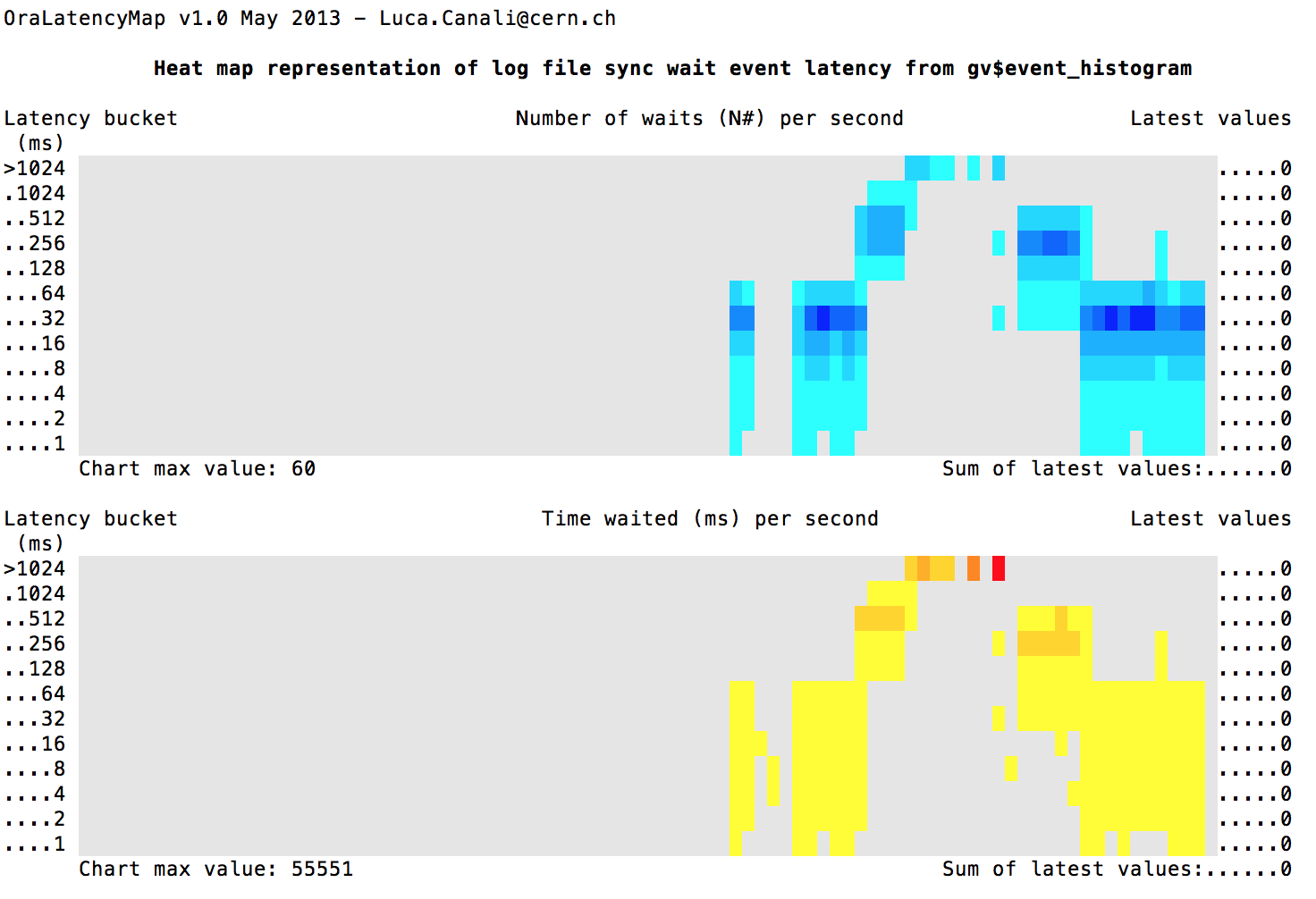
The graphic shows the latency heatmap of “log file sync”. I was running a swingbench load and at the same time throttling I/O such that latencies started off good then got worse and then back to normal.
All I did was type
sqlplus / as sysdba @OraLatencyMap_event 3 "log file sync"
This was created by Luca Canali , see http://externaltable.blogspot.com/2013/05/latency-heat-map-in-sqlplus-with.htm
Now if we combine this monitoring, with the I/O throttling documeted by Frits Hoogland here https://fritshoogland.wordpress.com/2012/12/15/throttling-io-with-linux/ , we can really have some fun and even draw latency words:
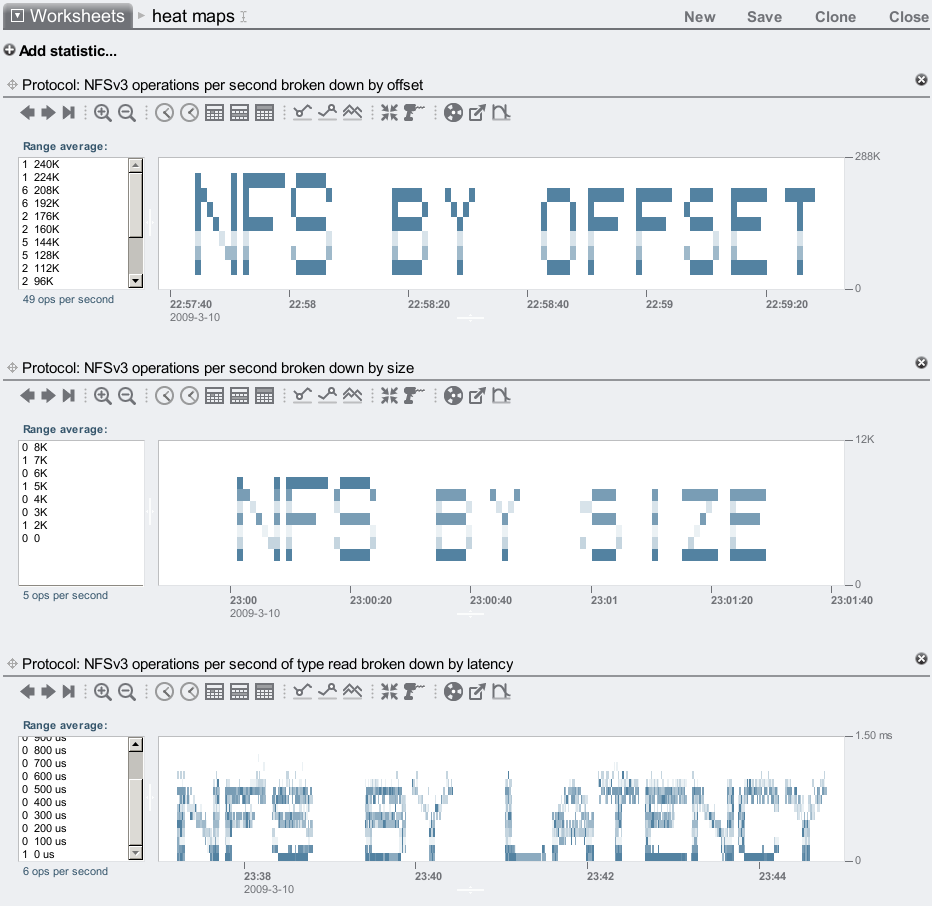
Run an auto refresh color coded heatmap on “log file sync” in sqlplus by typing
sqlplus / as sysdba @OraLatencyMap_event 3 "log file sync"
where OraLatencyMap_event.sql and OraLatencyMap_internal.sql are your current directory or sqlpath
Now to play with LGWR latency with cgroup throttles see
https://fritshoogland.wordpress.com/2012/12/15/throttling-io-with-linux/
# install cgroups on 2.6.24 LINUX or higher yum intall cgroup # setup /cgroup/blkio grep blkio /proc/mounts || mkdir -p /cgroup/blkio ; mount -t cgroup -o blkio none /cgroup/blkio cgcreate -g blkio:/iothrottle # find the device you want df -k # my Oracle log file divice was ls -l /dev/mapper/vg_source-lv_home lrwxrwxrwx. 1 root root 7 May 1 21:42 /dev/mapper/vg_source-lv_home -> ../dm-2 # my device points to /dev/dm-2 ls -l /dev/dm-2 brw-rw----. 1 root disk 253, 2 May 1 21:42 /dev/dm-2 # my device major and minor numbers are "253, 2" # create a write throtte on this device (for read just replace "write" with "read" # this limits it to 10 writers per second cgset -r blkio.throttle.write_iops_device="253:2 10" iothrottle # look for lgwr ps -ef | grep lgwr oracle 23165 1 0 13:35 ? 00:00:19 ora_lgwr_o1123 # put lgwr pid into throttle group echo 23165 > /cgroup/blkio/iothrottle/tasks # now play with different throttles cgset -r blkio.throttle.write_iops_device="253:2 1" iothrottle cgset -r blkio.throttle.write_iops_device="253:2 10" iothrottle cgset -r blkio.throttle.write_iops_device="253:2 100" iothrottle cgset -r blkio.throttle.write_iops_device="253:2 1000" iothrottle # if you are finished then delete the throttle control group cgdelete blkio:/iothrottle
May 22, 2013: Full day of Oracle hands on labs, free! (bay area)
May 1st, 2013

Oracle OTN is hosting a full day of free* hands on Oracle labs on May 22, 2013 in Pleasanton, Ca
- Re-engineering Your Database Using Oracle SQL Developer Data Modeler 3.1
- Learn how to use SQL Developer Data Modeler to import your database schema, make changes and generate the modified DDL.
- Testing and Debugging Procedures using SQL Developer 3.1
- Learn how to use Application Express to load data into your database, create an application with a variety of page types (including a interactive report, calendar and data load wizard).
- Building an Application using Oracle Application Express: Part 1 and part 2
- Learn how to use Application Express to load data into your database, create an application with a variety of page types (including a interactive report, calendar and data load wizard).
Learn rapid application development (RAD) with Oracle tools. Veteran OTN instructor David Peake will lead an end-to-end, soup-to-nuts session on using Data Modeler to design a database, SQL Developer to build tables, and Application Express to build a web-based application. Attendees must bring their own laptop containing the Developer Day virtual machine fromhttp://goo.gl/cvBo8. AEach session in this track builds upon the previous session so please plan on attending all four sessions in this track.
To participate in the labs you have to be a member of NoCOUG but for a limited time we are offering a limited number of free one day passes to this special OTN event. Please contact me at kyle.hailey@delphix.com if you are not a member of NoCOUG but would like to attend the OTN labs. If you are already a member of NoCOUG and would like to attend the lab sessions, register here.

Not only will there be a full day of OTN labs but there will be awesome talks by renown Oracle speakers.
If you are a DBA type you may be thinking “why should I attend the OTN labs?” My response would be: Why broaden your horizons? Why get out of your comfort zone? Why learn new skills? Why bother taking advantage of the magnificent educational smorgasbord that we call NoCOUG? When ever I have the chance I try and learn new skills. One never knows what tomorrow will bring and having a wide array of skills will allow me to grow into new areas that prove in more demand or more interesting.


recent comments